
Manually Sort Start Menu List Items in Windows 7

Software Architecture, DevOps & System Design
Windows 7 automatically manage to sort programs list alphabetically in start menu. If you try to change the order of list manually, it will not work.
There is an option to enable and disable this alphabetic sorting of list. So, after disabling, you can alter them in the order you like. For this, follow these steps.
1. Right click on the Taskbar and go to properties.
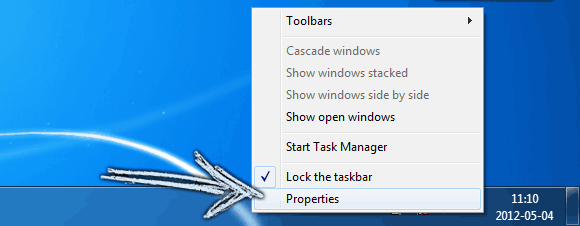
2. Go to "Start Menu" tab and click on "Customize" button.
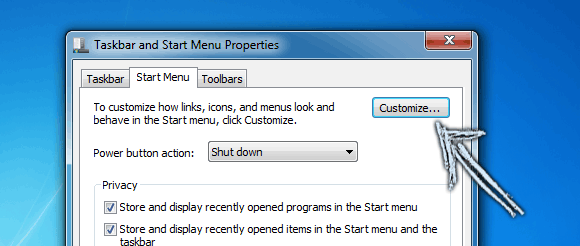
3 Scroll down the list of the new window to find "Sort All Programs menu by name" check box. Un-check that box, and hit OK. Now you should be able to move any entry to your own desired position.

Again, if you wish to enable automatic alphabetical sorting, check that box and you would be done.

Sandeep Kumar
Founder & Software Architect | Author of “The Operational State Control Plane”
Electronics engineer, software architect, and author of The Operational State Control Plane. Specializing in system design, distributed resilience, and building scalable tech solutions with real-world engineering insights.