
Get Location of the File Currently Opened in Notepad

Software Architecture, DevOps & System Design
Notepad is favorite tool for plain text editors, simply because of its clean interface which is faster and easier to use for basic text operations.
The best thing is that it doesn't support any styling or formatting of text. However you can change font type and size but not the color. It does support tab character and includes basic find/replace feature.
Unfortunately like other Microsoft editors, it doesn't have Recent Doc entries, so getting location of the file that is open was a tricky task.
How-to Check Path of the File?
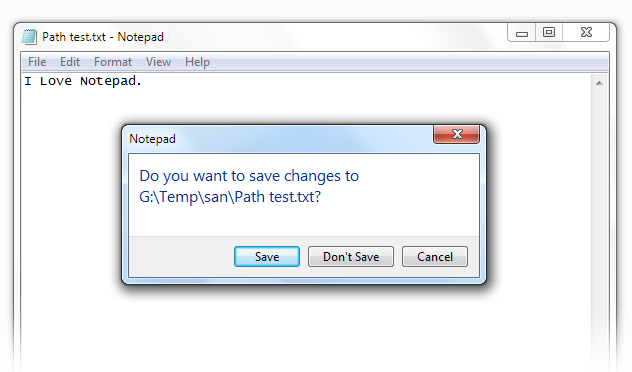
If the file is modified after last save, its okay. Otherwise modify it by putting just a single character. No matter if you put a comma or a full stop.
Now click on the close button on the right top most corner of the application window. It will prompt you with the full location of the file.
So you have got the location. Now click on Cancel button and you will be returned to the file back.
Sorry to call it a trick but this was something untold till now.

Sandeep Kumar
Founder & Software Architect | Author of “The Operational State Control Plane”
Electronics engineer, software architect, and author of The Operational State Control Plane. Specializing in system design, distributed resilience, and building scalable tech solutions with real-world engineering insights.