
Fix: Windows Awake from Sleep on Mouse Move or Click

Software Architecture, DevOps & System Design
I recently purchased a Dell wireless mouse from Amazon that comes with a USB nano-receiver and a mouse. It is a Plug-and-Play device, that means, I can start using it without installing any software. It sounds very cool, but that was the problem. By default this mouse was set to resume my laptop from sleep on movement or click.
I was using the mouse to click on sleep button of Windows 8, and then lifting it up to physically turn off the switch. By this time my crazy PC was waking up sensing the movement before I could switch off the mouse.
Solution
Step 1
Go to "Manage" option in "This PC" menu.
[

](https://assets.techvigil.com/assets/201606/413-manage-this-pc.png)
Step 2
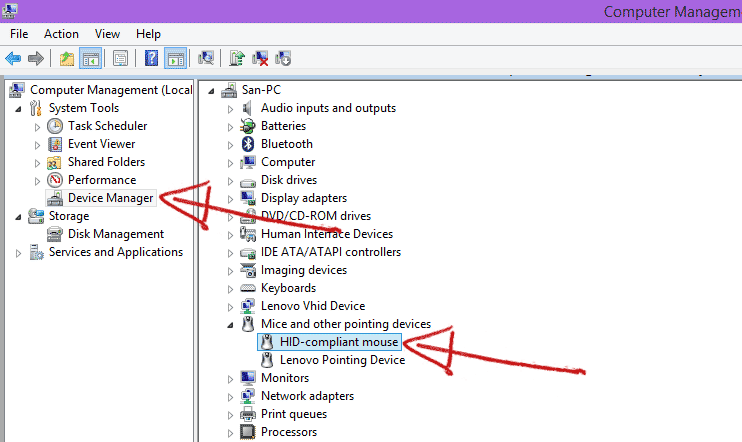
Go to "Device Manager" on right side menu and then expand the "Mice and other pointing devices".
[
](https://assets.techvigil.com/assets/201606/413-device-manager.png)
Step 3
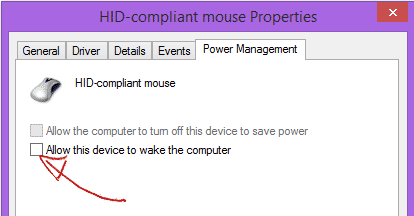
Choose your device and right click on it. Go to properties, uncheck the item which says "Allow this device to wake the computer". Click "OK" to save and exit.
[
](https://assets.techvigil.com/assets/201606/413-mouse-prevent-wake-computer.png)

Sandeep Kumar
Founder & Software Architect | Author of “The Operational State Control Plane”
Electronics engineer, software architect, and author of The Operational State Control Plane. Specializing in system design, distributed resilience, and building scalable tech solutions with real-world engineering insights.