
What Is CNP Channel in SBI Debit Card? How to Manage Limits and Online Payments

Software Architecture, DevOps & System Design
In this article
- What the CNP (Card Not Present) channel means on State Bank of India debit cards and how it differs from physical ATM and store swiping.
- Why turning off online and international transactions shields your bank balance from unauthorized charges, hidden subscriptions, and data leaks.
- Step-by-step methods to turn the channel on or off using the SBI YONO app, OnlineSBI net banking, or simple SMS commands.
- Why new SBI debit cards automatically decline online shopping until you activate this setting.
- Practical tips to set daily spending limits so you can shop online safely without risking your full savings account.
The Bottom Line: The CNP (Card Not Present) channel on an SBI debit card controls all internet-based purchases where your physical card is not dipped or tapped into a machine—such as shopping on Amazon, booking train tickets, or paying for app subscriptions. Because internet purchases are most vulnerable to online fraud and overseas charges that skip OTP verification, you should keep the CNP channel turned off or set to a low daily limit, enabling it only when you are ready to make a purchase.
Whenever I get a new debit card from State Bank of India (SBI), my very first step is not memorizing the PIN or putting it in my wallet. Instead, I open my banking dashboard and check which payment channels are turned on.
A few years ago, a friend called me in a panic: small recurring dollar payments were being deducted from his SBI savings account by an overseas company he had never used. His card was sitting safely in his pocket, and he had never received an OTP on his phone.
The issue was simple: his debit card had its CNP channel and International usage enabled. Someone had obtained his 16-digit card number, expiry date, and CVV from an earlier online purchase and used it on an overseas website where OTPs are not required.
Understanding what the CNP channel is—and knowing how to turn it on or off in a few seconds—is one of the easiest and most powerful ways to protect your hard-earned money.
What Does CNP Channel Mean in SBI Debit Cards?
CNP stands for Card Not Present. It refers to any transaction where neither you nor your physical debit card is physically present at a store counter or checkout machine.
When you buy groceries at a supermarket, you hand over your card or tap it on a payment terminal. That is a Card Present transaction.
In contrast, when you buy something on Amazon or Flipkart, book a ticket on IRCTC, order food on Zomato, or pay for Netflix, you simply type your card number, expiry date, and CVV into a website or app. Because the merchant never touches or reads the physical chip on your card, the bank classifies this as a Card Not Present (CNP) transaction.
+-----------------------------------------------------------------------+
|                       SBI DEBIT CARD CHANNELS                         |
+-----------------------------------------------------------------------+
        |                                   |                    |
        v                                   v                    v
  [ATM Channel]                       [POS Channel]        [CNP Channel]
  Cash Withdrawals                    In-Store Swipes      Online Shopping
  - Physical Card: YES                - Physical Card: YES - Physical Card: NO
  - Requires: ATM PIN                 - Requires: POS PIN  - Requires: Card Details + OTP
Does Disabling the CNP Channel Block ATM Withdrawals or In-Store Swipes?
No, absolutely not. SBI treats each channel completely independently.
- ATM Channel: Controls withdrawing cash from ATM machines.
- POS Channel (Point of Sale): Controls swiping, dipping, or tapping your card at physical stores, petrol pumps, and restaurants.
- CNP Channel: Controls online shopping, app payments, and recurring digital subscriptions.
Turning off the CNP channel only blocks online and e-commerce payments. Your card will continue to work normally whenever you withdraw cash at an ATM or pay at a store terminal.
Why Do Newly Issued SBI Debit Cards Fail Online Transactions?
If you recently received a new or replacement SBI debit card and your first online transaction was declined with an error like "Transaction declined by issuing bank", do not worry—your card is not defective.
According to the official SBI advisory on Enhanced Security of Card Transactions (issued under Reserve Bank of India consumer safety directives), all Indian banks must issue new and renewed cards with online (CNP), international, and contactless payments disabled by default.
This security measure ensures that if a newly mailed card is stolen from your letterbox or lost in transit, nobody can drain your account online. You, the account owner, must deliberately log in and switch on the CNP channel before your card can be used on internet sites.
Why You Should Keep International CNP Disabled
Inside SBI's card settings, you will notice separate controls for Domestic and International transactions:
- Domestic CNP (Indian Websites): When you buy something on an Indian website, the RBI strictly requires two-factor authentication. You will always receive an SMS with a 3D Secure OTP (One-Time Password) on your mobile number to authorize the payment.
- International CNP (Overseas Websites): Many international merchants (like Amazon US, Apple, SaaS subscriptions, or overseas travel portals) do not ask for an OTP. They only require the 16-digit card number, expiry date, and CVV to deduct funds immediately.
If both CNP and International usage are left enabled, any scammer who gets your card details from a data leak can make unauthorized overseas purchases without you ever receiving an OTP.
[!WARNING] Keep the International Usage setting turned off unless you are traveling abroad or making a foreign purchase. Once your payment is complete, turn it back off immediately.
Channel Comparison: ATM vs. POS vs. CNP
Here is a simple breakdown of how the three main SBI card channels work:
| Channel | Where It Is Used | Is Physical Card Needed? | How It Is Verified | Security Risk |
|---|---|---|---|---|
| ATM | Cash withdrawal machines | Yes | 4-digit ATM PIN | Low |
| POS (Point of Sale) | Store checkouts, petrol pumps | Yes | Card chip + PIN (or tap for small amounts) | Low |
| Domestic CNP (Online) | Indian websites and apps | No | Card details + SMS OTP | Medium |
| International CNP | Foreign websites and services | No | Card details only (often no OTP) | High |
How an Online SBI Card Payment Works Behind the Scenes
When you enter your card details on an online shopping site, here is the quick step-by-step path the payment takes:
If your CNP channel is turned off, SBI instantly stops the transaction at step 3. The website is told that online transactions are not permitted on this card, your bank account is not touched, and no money is deducted.
In the past, banks tested faster payment flows for specific trusted portals—such as options to skip OTP verification for IRCTC train tickets to save time during tatkal booking. But for everyday card usage, having full control over your card channels gives you the best protection without any complexity.
How to Manage CNP and Set Limits: Three Easy Methods
SBI provides three easy ways to control your debit card channels. You can use the mobile app, your phone's SMS app, or the net banking website.
Method 1: SBI YONO Mobile App (Easiest for Smartphone Users)
The YONO app is the fastest way to turn online purchases on before buying something and off right after.
- Open the YONO SBI app and log in using your MPIN or fingerprint.
- Scroll down on the home screen and tap Service Requests (or open the side menu).
- Tap on ATM / Debit Card.
- Enter your Internet Banking Profile Password.
- Tap Manage Cards.
- Select your bank account and debit card number.
- Tap Manage Usage.
- You can now toggle:
- E-Commerce (CNP) Transactions: Turn ON when you want to shop online; turn OFF when done.
- POS Transactions: Keep ON for paying in shops.
- ATM Transactions: Keep ON for cash withdrawals.
- International Transactions: Keep OFF for daily safety.
- Switch to the Manage Limits tab if you want to set a daily maximum spending cap (e.g., ₹5,000 or ₹10,000).
- Tap Submit and enter the OTP sent to your phone to save the settings.
Method 2: Fast SMS Quick Toggles (Works Without Internet)
If you do not have internet access or the YONO app is undergoing maintenance, you can toggle your card channels by sending a quick SMS from your registered mobile number to 09223966666:
| What You Want to Do | SMS Command | Example (Last 4 digits: 1234) |
|---|---|---|
| Turn ON Online (CNP) Purchases | SWON ECOM <last 4 digits> | SWON ECOM 1234 |
| Turn OFF Online (CNP) Purchases | SWOFF ECOM <last 4 digits> | SWOFF ECOM 1234 |
| Turn ON International Usage | SWON INTL <last 4 digits> | SWON INTL 1234 |
| Turn OFF International Usage | SWOFF INTL <last 4 digits> | SWOFF INTL 1234 |
| Turn ON Store POS Swipes | SWON POS <last 4 digits> | SWON POS 1234 |
| Turn OFF Store POS Swipes | SWOFF POS <last 4 digits> | SWOFF POS 1234 |
| Turn ON ATM Withdrawals | SWON ATM <last 4 digits> | SWON ATM 1234 |
| Turn OFF ATM Withdrawals | SWOFF ATM <last 4 digits> | SWOFF ATM 1234 |
Within a minute, SBI will reply with a confirmation message that your card channel has been updated.
[!TIP] Save
09223966666in your phone contacts as "SBI Card Control". If you ever suspect suspicious activity or lose your card, you can immediately sendSWOFF ECOM 1234andSWOFF INTL 1234without needing an internet connection.
Method 3: OnlineSBI Net Banking Portal
If you prefer using a desktop browser, you can configure your card limits and channels on the official OnlineSBI net banking portal.
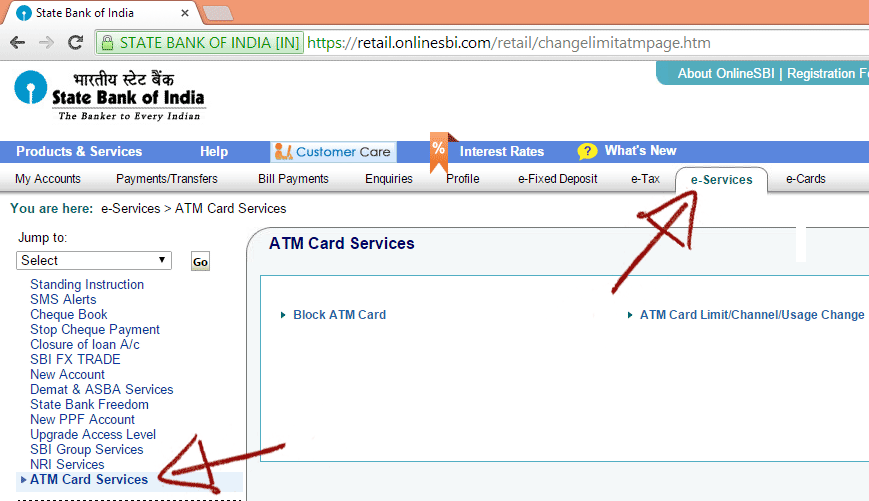
Step 1: Open ATM Card Services
Log in to your account at onlinesbi.sbi.bank.in. In the top menu bar, click on e-Services, select ATM Card Services, and click on ATM Card Limit/Channel/Usage Change.
Step 2: Choose Your Account and Service
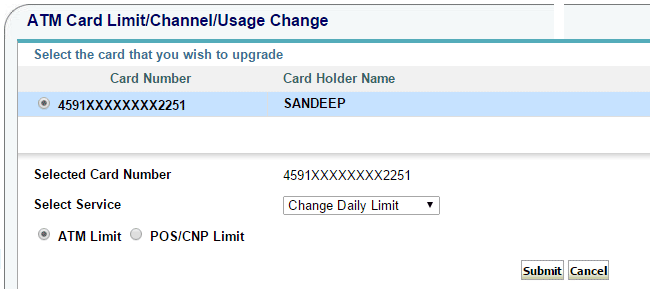
Select the account your card is linked to, then pick your debit card number. From the Select Services drop-down menu, you can choose:
- Change Daily Limit: To set a maximum daily amount for shopping or cash withdrawals.
- Change Channel Type: To turn specific channels on or off.
Step 3: Setting a Daily Limit
If you select Change Daily Limit, you will see two fields:
- ATM Limit: Sets the daily cash withdrawal limit from ATMs.
- POS/CNP Limit: Sets the maximum daily spending limit for store swipes and online purchases.
Lowering this limit (for example, setting it to ₹10,000 instead of the maximum limit) ensures that even if someone gets access to your card, they cannot make large purchases.
Step 4: Turning Off the CNP Channel
To disable online purchases, select Change Channel Type from the service drop-down.
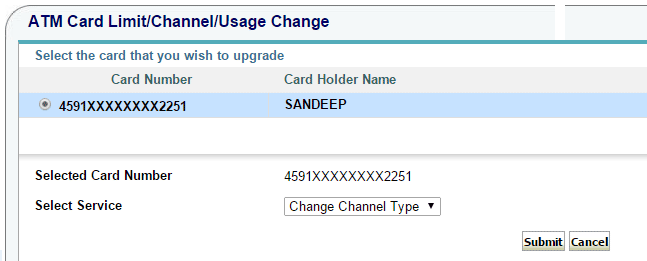
Select CNP Channel from the list, choose the Disable option, and click Submit.
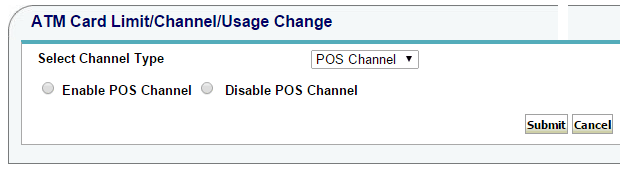
Confirm with the OTP sent to your phone, and the channel will be disabled immediately.
Helpful Tips for Everyday Card Safety
- Keep International Usage Turned OFF: Unless you are traveling abroad or paying for an overseas subscription, keep international transactions switched off.
- Set a Modest Daily Online Limit: Keep your daily CNP limit set to what you typically spend (e.g., ₹5,000). You can increase it in the YONO app whenever you need to make a larger purchase like flight tickets.
- Be Aware of Recurring Subscriptions: If you pay for Netflix, Spotify, or other monthly subscriptions on your debit card, turning off the CNP channel will cause your next monthly payment to fail. For recurring bills, consider using UPI AutoPay or keeping a dedicated low-balance card.
- Card Tokenization Still Follows Your Channel Rules: Even when apps like Amazon or Swiggy save your card securely using tokenization, your SBI channel rules still apply. If CNP is disabled, tokenized transactions will also be declined.
Taking two minutes to review these settings gives you complete peace of mind that your SBI debit card is protected against unexpected online charges.

Sandeep Kumar
Founder & Software Architect | Author of “The Operational State Control Plane”
Electronics engineer, software architect, and author of The Operational State Control Plane. Specializing in system design, distributed resilience, and building scalable tech solutions with real-world engineering insights.