
Android Bluetooth/WiFi are Active in Background Even When Turned Off

Software Architecture, DevOps & System Design
Till yesterday I was under impression that I am saving my cellphone's battery by turning off WiFi and Bluetooth of my Android device. While that might be true to some extent, these peripherals continue to work even when turned off.
It's a known fact that Android uses WiFi signals to improve the user's location. Starting from Marshmallow, Bluetooth scanning is also added in background to improve location accuracy
Turn Off Background Scanning
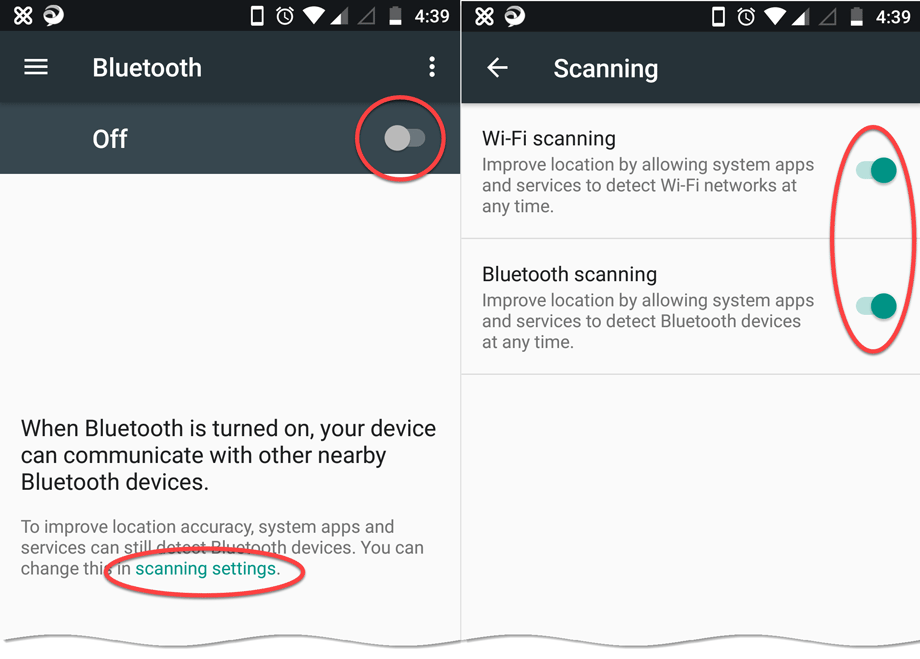
By default background scanning of these two modules are active even you switch them off from settings. To completely turn them off, go to either Bluetooth or WiFi settings and tap on Scanning Settings.
In the next screen you can turn off each one of them. Below is the screenshot from my Moto G5 Plus (Android 7.0).
[
](https://assets.techvigil.com/assets/201711/424-android-bluetooth-wifi-scanner.png)

Sandeep Kumar
Founder & Software Architect | Author of “The Operational State Control Plane”
Electronics engineer, software architect, and author of The Operational State Control Plane. Specializing in system design, distributed resilience, and building scalable tech solutions with real-world engineering insights.