
Setup Tata Docomo PPoE on D-LINK 2750U Router

Software Architecture, DevOps & System Design
I am using D-LINK DSL-2750U Router for three years now and never had any issue. Today, I had to reset it for some reasons and then I had tough time to configure it again for my Docomo wired broadband. I searched for settings on multiple forums and somehow they didn't worked. I called their toll free support number 1800-266-1515 to get technical assistance, they logged my complaint which was not possible to resolve before next working day.
With some help from Internet and little bit of trial and error I managed to make it work. I thought to share the configuration parameters which worked for me.
Setup PPoE on DSL-2750U
Step 1: Login to your router with default credentials - admin/admin if you have just reset it.
Step 2: Navigate to Setup->Internet Setup->Add
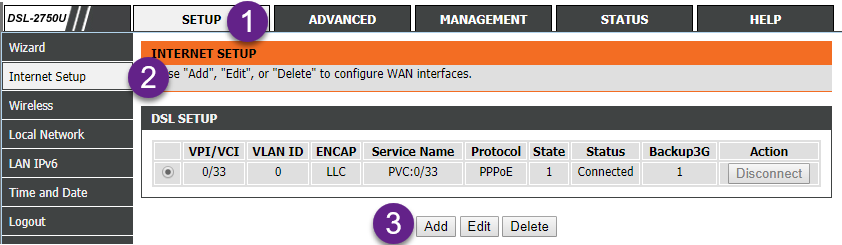
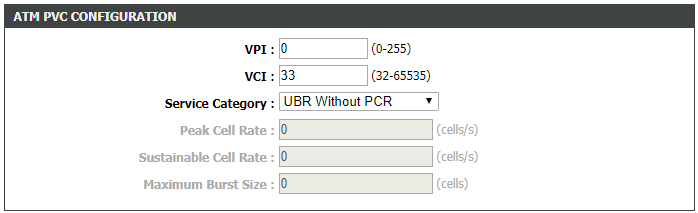
Step 3: You will some default values in the setup form. We need to update only some of them.
VPI
0
VCI
33
Service Category
UBR without PCR
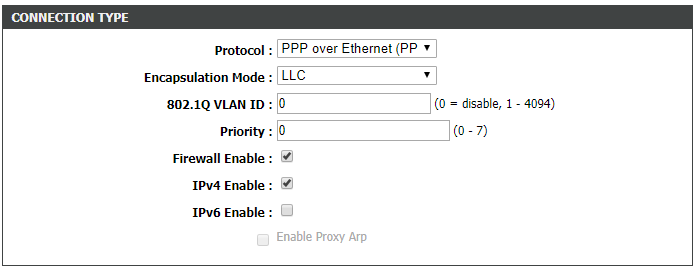
Protocol
PPoE
Encapsulation Mode
LLC
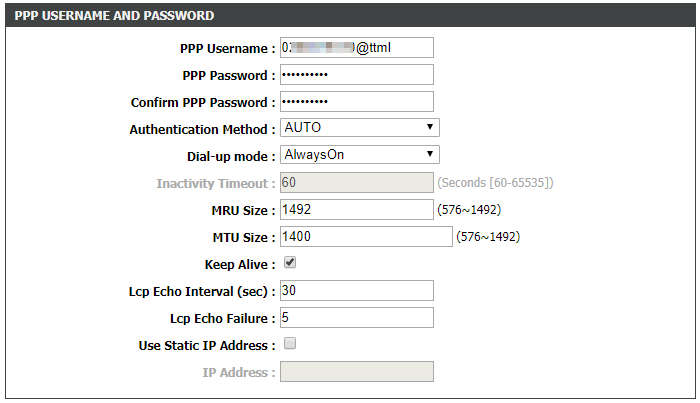
PPP Username
0200XXXXXX@ttml
PPP Password
989XXXXXX
PPP Username is your CDMA/ Walky/ Photon Number including STD code in the format 0200XXXXXX@ttml
PPP Password is your Docomo account number. Leave other parameters as it is and apply the changes. After applying wait for 30-40 seconds. Your connection should start working.
Screenshots
[
](https://assets.techvigil.com/assets/201801/425-atm-pvc-settings.png)[
%5B)
](https://assets.techvigil.com/assets/201801/425-connection-type.png)[
%5B)
](https://assets.techvigil.com/assets/201801/425-ppp-credentials.png)

Sandeep Kumar
Founder & Software Architect | Author of “The Operational State Control Plane”
Electronics engineer, software architect, and author of The Operational State Control Plane. Specializing in system design, distributed resilience, and building scalable tech solutions with real-world engineering insights.