
How to Check Last Opened Apps on Android (Even if History is Cleared)

Software Architecture, DevOps & System Design
In this article
- Discover a hidden diagnostic menu available on most Android devices.
- Learn how to access usage statistics using a secret USSD dialer code.
- Find out exactly when specific apps were last opened on your phone.
- Understand why the standard "Recent Apps" switcher isn't always reliable.
- See which Android versions and smartphone brands support this hidden feature.
The Bottom Line: You can access a hidden diagnostic menu on most stock Android devices by dialing *#*#4636#*#*. This menu reveals raw usage statistics, allowing you to see exactly when apps were last opened, even if they've been swiped away from the recent apps history.
Android currently commands a massive share of the global smartphone market. Though our phones are highly personal devices, friends or family members often borrow them out of curiosity and sometimes sneak through different apps. Before handing the device back to you, they might swipe away all the cards from the recent apps history, leaving you with no obvious way to know what they were doing.
In this article, we will learn exactly how to check last opened app history on an Android device, even if it is no longer showing in the recent apps switcher.
The Magic of ##4636## (INFO)
To access these hidden statistics, open the dialer on your Android phone and press *#*#4636#*#*.
You might wonder, why this specific string of numbers? The number 4636 actually corresponds to the letters INFO on a standard T9 telephone keypad. Because of this, the code is often referred to as the *#*#INFO#*#* diagnostic code. It's an Unstructured Supplementary Service Data (USSD) code-a protocol used by cellular telephones to communicate with the service provider's computers, though in this case, it's caught locally by the Android OS to launch a hidden TestingSettings activity.
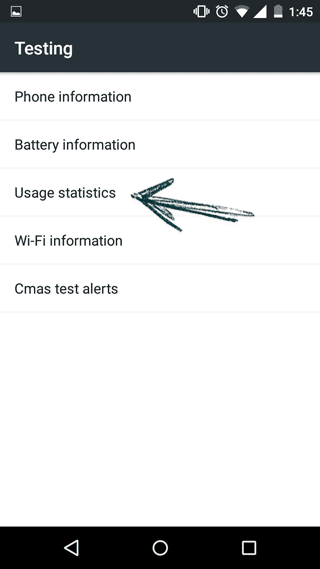
Once dialed, it will immediately take you to a Testing screen with a list of menus similar to the one below.
Viewing Usage Statistics
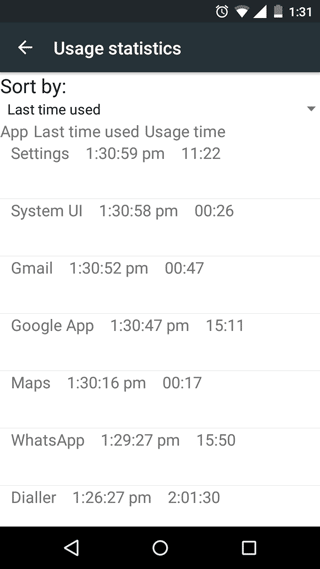
Tap on Usage statistics. This will take you to a slightly unstyled, raw data page displaying app usage metrics.
Use the dropdown menu at the top to sort by Last time used. Now you can see exactly which apps were launched and at what time. You can safely ignore some common background entries like System UI, Google App, or various system services.
Supported Android Versions and OEM Quirks
This hidden menu has been a staple of the Android operating system for over a decade. It was accessible in the early days of Android 1.5 (Cupcake) and Android 1.6 (Donut), and it remains functional in modern releases all the way up to Android 14 (Upside Down Cake) and beyond.
However, there is a catch. This code is primarily designed for stock or near-stock Android devices (like Google Pixel, Motorola, or older Nexus phones). Many smartphone manufacturers who use heavily customized Android skins actively disable this code or replace it with their own proprietary diagnostic menus.
For example, Samsung devices like the Galaxy series run One UI, which often blocks this 4636 USSD code. If you are on a Samsung phone, the easiest alternative is to check it directly from the Apps list:
| Method / Instructions | Screenshot |
|---|---|
| 1. Go to Settings > Apps. 2. Tap the small Filter and sort icon (next to "Your apps"). 3. Under "Sort by," select Last used and tap OK. | 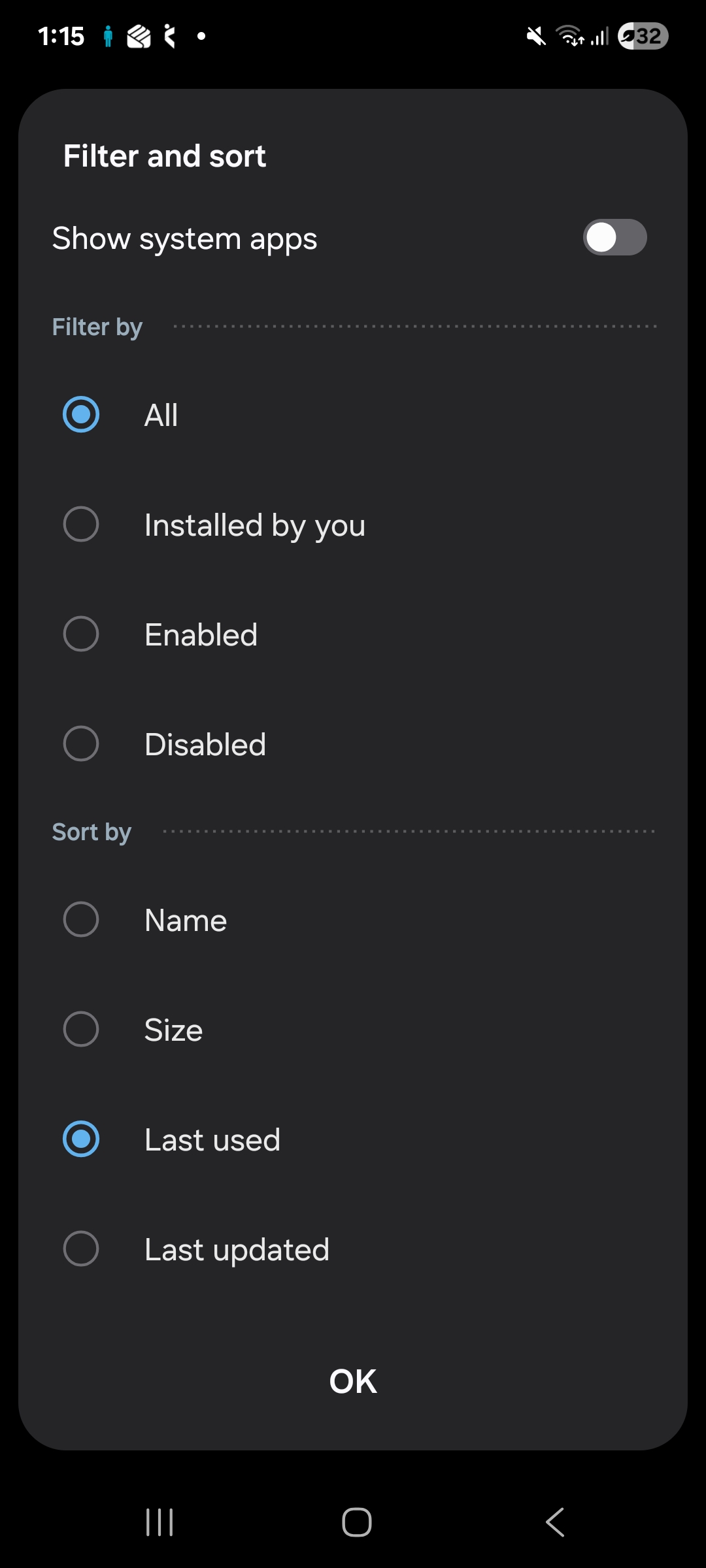 |
| The apps will instantly rearrange themselves, placing the most recently opened applications at the very top of the list. | 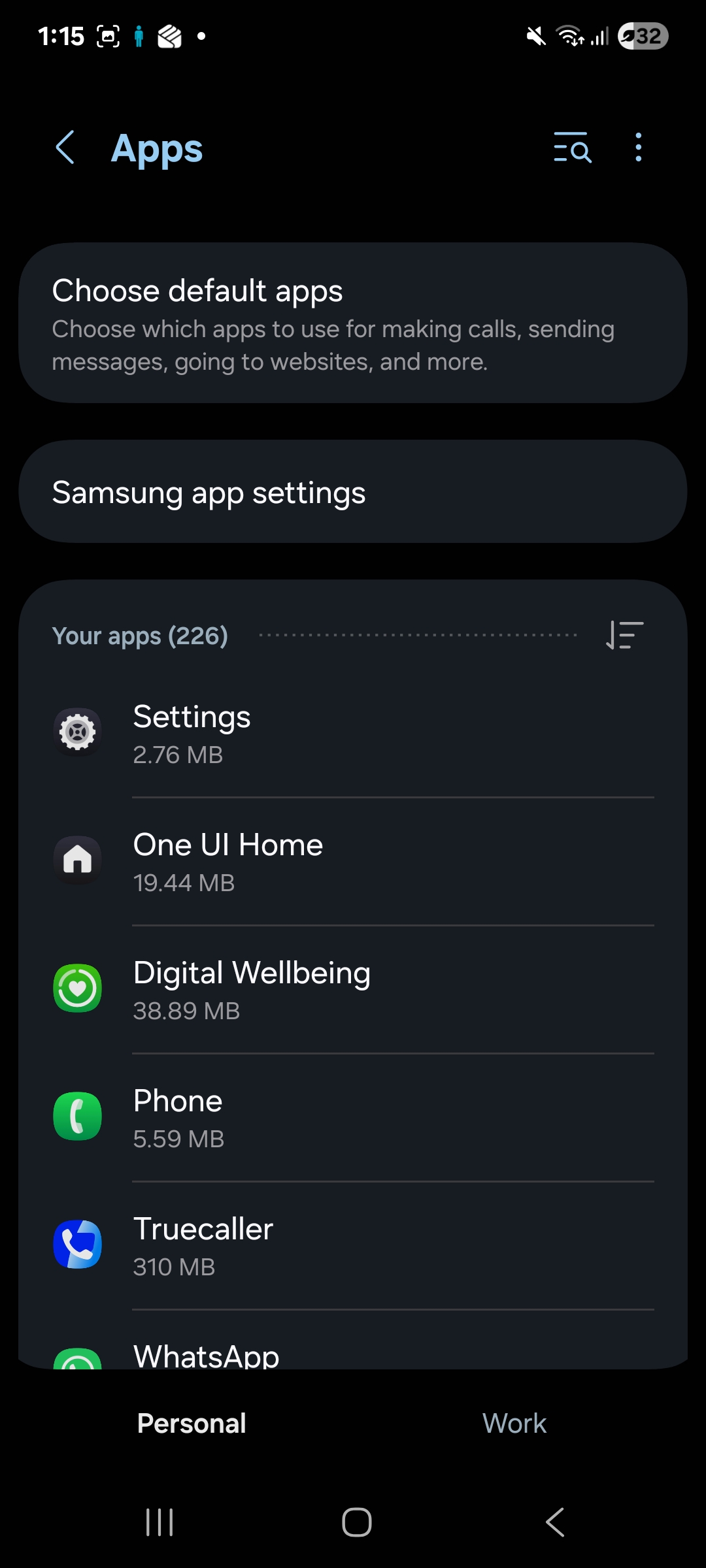 |
Key Takeaways
From my experience tinkering with Android internals, the *#*#4636#*#* menu is a fantastic diagnostic tool, not just for catching snooping friends, but for genuine troubleshooting. Besides usage statistics, it provides deep insights into battery health and detailed Wi-Fi telemetry. However, treat this menu with respect-it is an engineering tool, and modifying network parameters in the "Phone information" section can sometimes lead to connectivity issues if you aren't sure what you're changing.
Related Reads

Sandeep Kumar
Founder & Software Architect | Author of “The Operational State Control Plane”
Electronics engineer, software architect, and author of The Operational State Control Plane. Specializing in system design, distributed resilience, and building scalable tech solutions with real-world engineering insights.